
WooCommerce Conditional Shipping Pro enables you to make role-based rules for shipping methods. This can be used to:
- Offer wholesalers different shipping methods, e.g. weight-based instead of flat rate
- Disable or set higher threshold for free shipping for wholesalers
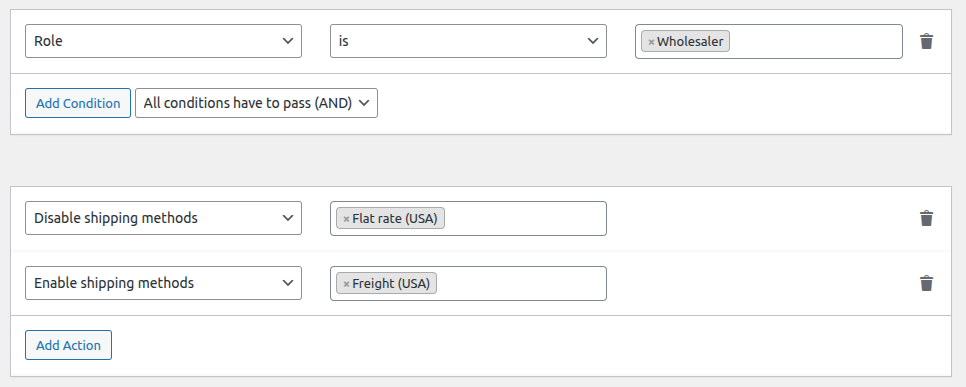
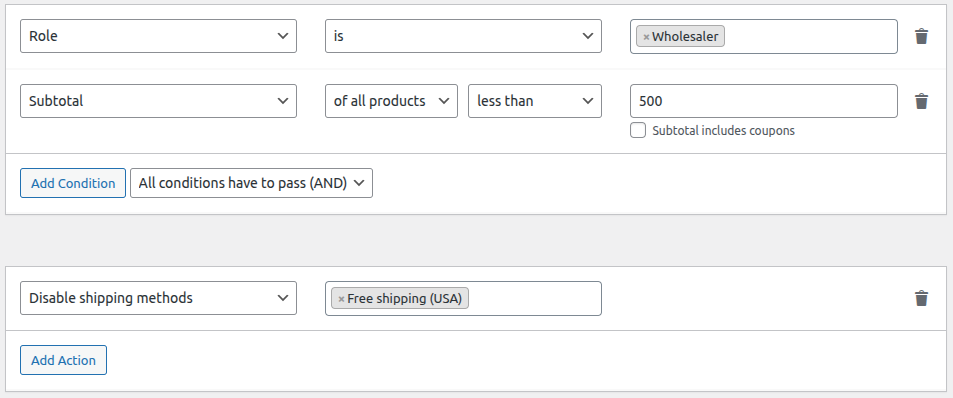
In this example, we will activate weight-based shipping (Freight) for wholesalers and disable flat rate. In addition, we set free shipping threshold of $ 500.
How to set it up
- Go to WooCommerce > Settings > Shipping > [shipping zone]
- Add a new shipping method, e.g. Freight
- Go to WooCommerce > Settings > Shipping > Conditions
- For the weight-based shipping, add the following ruleset:
- For free shipping threshold, add the following ruleset:
- Click Save changes
Now Flat rate will be disabled for wholesalers and Freight activated. In addition, Free shipping will only be available for wholesalers if the subtotal exceeds $ 500.


